
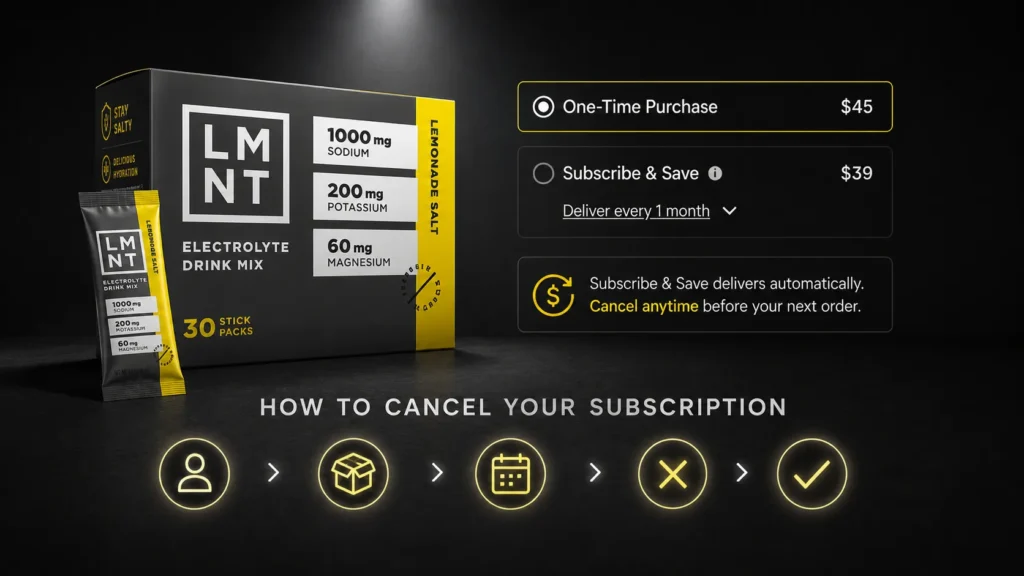
To cancel an LMNT subscription, sign in to your account, open the subscription-management page, locate the active plan, and select the cancellation option. Review the next shipment date before making changes because an order already processed may follow a different refund policy. Keep the confirmation email and check that the plan no longer appears as active.
Table of Contents
The slightly confusing part – and the reason most people end up searching for this – is what “canceling” actually means on LMNT’s platform. On their system, Cancel and Pause are the same thing. When you cancel, your subscription stops renewing but your account stays open. Nothing gets deleted. You can reactivate anytime. It is more of a freeze than a termination.
This guide covers exactly how to cancel LMNT subscription online, what happens to your account afterward, how to change flavors before canceling if that is the real issue, what their refund policy covers, and alternatives to fully canceling if you just need a break from the packets piling up.
Before You Cancel: Is a Change Actually What You Need?
Most people who search for how to cancel LMNT subscription fall into one of four buckets. One – they have too much product and do not need another shipment right now. Two – they want a different flavor. Three – the price feels hard to justify. Four – they genuinely want to stop entirely.
If the issue is number one or two, canceling is not necessarily the move. LMNT’s subscription system lets you skip an upcoming shipment, change your delivery frequency, or swap flavors – all from the same account page. Doing any of those takes the same two clicks as canceling. Knowing the options first saves you from accidentally stopping something you actually want to keep.
If the real question is whether LMNT is worth the price at all, our LMNT vs Ultima Replenisher comparison breaks down exactly how the formulas differ and whether the cost premium is justified for your specific situation.
How To Cancel LMNT Subscription Online: The Official 2-Step Process

These steps come directly from LMNT’s official Help Center. This is not a workaround or a third-party guide – it is exactly what their support team instructs.
Step 1: Log into your account and go to Subscriptions
Go to drinklmnt.com and sign in to your account. Once inside, navigate to the Subscriptions section. This is listed directly on your account dashboard. You will see all active subscriptions listed here – each flavor or product line you subscribe to appears as a separate entry.
Step 2: Click Cancel Subscription next to the subscription you want to stop
Find the subscription you want to cancel and click the Cancel Subscription button next to it. That is the entire process. LMNT confirms the cancellation immediately, and your subscription stops renewing from that point forward.
That is genuinely it. Two steps from their official help page. If you have multiple subscriptions (for example, a Citrus Salt subscription and a separate Variety Pack subscription), you cancel each one individually with the same two clicks.
Important: What ‘Cancel’ Actually Means on LMNT’s Platform
On LMNT’s system, Cancel and Pause are functionally identical. When you cancel, your subscription enters a stopped state but stays on your account. It will not renew unless you manually reactivate it. Nothing gets deleted. Your order history, saved addresses, and payment methods all stay in place. This is actually subscriber-friendly – if you decide you want LMNT again in three months, you reactivate with one click rather than setting up a new subscription from scratch.
How Do LMNT Subscriptions Work? The Full Picture
Understanding how LMNT subscriptions work makes the cancellation process – and all the management options around it – much clearer.
Starting a Subscription
You start an LMNT subscription by selecting “Subscribe and Save” instead of “One Time Purchase” when adding any LMNT Drink Mix product to your cart. Once you complete that purchase, the subscription automatically begins and renews monthly by default. LMNT sends a reminder email before each renewal date so you have time to make changes before the next order processes.
Subscriptions for LMNT Drink Mix are available directly on drinklmnt.com. LMNT Sparkling subscriptions are handled separately through Amazon US – not through LMNT’s own website.
What You Get With a Subscription
The main benefit is price: subscription pricing is lower than one-time purchase pricing per box. LMNT also notes there is no price difference between a one-time purchase and a subscription for the 12-pack Sparkling format specifically, but the Drink Mix subscription does carry a discount.
Subscribers also get early access to new flavors and limited seasonal releases. LMNT has run limited editions like Watermelon with Mint and various Sparkling flavors that subscribers tend to hear about first.
Frequency Options
Monthly renewal is the default, but you can change it. LMNT lets you adjust your shipping frequency from the Subscriptions page by clicking Edit next to Frequency or Date of Delivery. You select from a dropdown menu, click Save, and your subscription adjusts. Common options include every 4 weeks, every 6 weeks, every 8 weeks, and every 12 weeks.
If you are getting packets faster than you can use them, changing frequency is a better solution than canceling. You keep the subscriber pricing and do not have to set up a new subscription later.
How to Change Flavors in Your Subscription (Without Canceling)

This is one of the most common subscription management questions – and the process is slightly non-intuitive, which is why people end up searching for it.
How to change flavors in your subscription on LMNT involves a cancel-and-replace process for individual flavor subscriptions. Here is what LMNT’s help center instructs for standard Drink Mix subscriptions:
Step 1: Log in and go to Manage My Subscriptions
Sign in at drinklmnt.com and navigate to Manage My Subscriptions from your account dashboard.
Step 2: Click Cancel Subscription on the flavor you want to change
Remember: canceling a flavor subscription has the same effect as pausing it – it will not renew unless reactivated. You are not losing anything permanently here. You are just stopping that specific flavor.
Step 3: Add a new subscription for the flavor you want
Go back to the shop, select the new flavor you want, choose Subscribe and Save, and complete the checkout. Your new subscription starts fresh with the next shipment on whatever frequency you select.
Step 4: Confirm the setup
Your account will now show the new flavor subscription. The previous flavor subscription remains in canceled/paused status and will not renew unless you reactivate it.
For the INSIDER Bundle subscription – which includes multiple flavors in one subscription – the process is simpler. Log in, go to Manage My Subscriptions, click Edit next to the flavor list, use the dropdown menus to swap flavors, and click Save. The Bundle subscription updates in place without the cancel-and-replace step.
LMNT’s Refund Policy: What You Need to Know
LMNT operates a no-questions-asked refund policy. That is their exact language on the help center – and it is genuinely one of the more subscriber-friendly policies in the supplement space.
If you were charged for a subscription before you managed to cancel it, or purchased a subscription by accident, LMNT will refund you without requiring an explanation. You reach their support team either by email at hello@drinklmnt.com or via live chat on their website (available Monday through Friday, 9 AM to 9 PM Eastern Time).
Have your order number ready when you reach out. It speeds up the refund process. LMNT support can see your account, locate the charge, and process the refund typically within one to two business days.
Good to Know:
If a subscription charge just processed and you have not yet canceled the subscription itself, do two things simultaneously: contact support about the refund and then also cancel the subscription through your account. Contacting support handles the current charge. Canceling the subscription prevents future charges. You need to do both to fully resolve the situation.
What About Opened Products?
LMNT’s no-questions-asked policy applies even if you have opened the product. Their refund page confirms they stand behind the product and will process refunds on product that did not work for you. Their Salty Support team – that is actually what they call their customer service team, which is both on-brand and somewhat charming – handles these on a case-by-case basis.
For the most current and complete refund terms, the official source is
For the most current refund terms, check LMNT’s official Refunds and Returns page directly – policies can update and the official page always takes precedence over third-party guides.
Skip or Pause Instead of Canceling: When This Makes More Sense
If your subscription renewal is coming up soon and you just need to skip one shipment, you do not need to cancel at all. LMNT sends an email before each renewal date specifically so you can make changes without canceling the whole subscription.
From the Subscriptions page, you can click on your upcoming order and select Skip Shipment. This skips the next renewal only and the subscription continues on its regular schedule after that. Useful if you are traveling, stocked up, or just need a month off.
For a longer break – say, two or three months – either update your shipping frequency to a longer interval (every 8 or 12 weeks) or simply cancel, which as established keeps your subscription in a paused state until you choose to reactivate. There is no time limit on how long a canceled subscription can sit before reactivation, so there is genuinely no urgency to make a final decision.
If you are reconsidering whether LMNT is the right product for your situation rather than just your subscription timing, our full LMNT vs Liquid IV comparison covers how both products compare on sodium, price, and taste – which are the three most common reasons people switch away from LMNT.
How to Contact LMNT Support If You Cannot Cancel Online

The online cancellation process covers the vast majority of situations. But occasionally an account has a technical issue, a charge processes unexpectedly, or you cannot locate the Cancel button. When that happens, LMNT support is the right next step.
- Email: hello@drinklmnt.com
- Live Chat: Available on drinklmnt.com, Monday through Friday, 9 AM to 9 PM Eastern Time
- Help Center: help.drinklmnt.com – searchable, with step-by-step guides for every account management function
LMNT does not publish a public phone number for customer support. Email and chat are the primary contact methods. Response times via email are typically one business day. Live chat is faster during business hours.
When you contact support, have your order number or account email address ready. That is all they need to locate your account and process whatever you need – whether that is a cancellation, a refund, or troubleshooting an account access issue.
Is LMNT Worth the Price? An Honest Assessment
Since a lot of people searching for how to cancel LMNT subscription are also questioning whether the product is worth continuing, this deserves an honest answer.
LMNT costs approximately $1.50 per packet at regular pricing, dropping to around $1.30 on subscription. For comparison: a 30-pack of Ultima Replenisher in canister format runs about $0.47 per serving. LMNT is meaningfully more expensive per serving than most electrolyte alternatives.
What you get for that price: 1,000 mg of sodium per packet, 200 mg of potassium, and 60 mg of magnesium malate – all in a zero-sugar, zero-artificial-dye, NSF Sport Certified formula. That sodium level is specifically designed for athletes, keto dieters, heavy sweaters, and people fasting – populations where standard-sodium electrolyte products fall short.
LMNT is worth the price if you actually need 1,000 mg of sodium per serving and want a clean formula with no sugar. It is not worth the price if you are sedentary, already eating a high-sodium diet, or just want daily general hydration support – in which case Ultima Replenisher at one-third the price covers six electrolytes at gentler doses that better fit a non-athletic context.
We compare both products in detail – sodium levels, magnesium, price per serving, and use cases – in our Ultima vs LMNT breakdown.
Alternatives If You Are Switching Away from LMNT
If you are canceling because LMNT is not the right fit rather than just the right timing, here are the most relevant alternatives based on common reasons for switching.
- Lower sodium, higher magnesium, budget-friendly: Ultima Replenisher – 55 mg sodium, 100 mg magnesium, six electrolytes, zero sugar, as low as $0.47 per serving in canister format.
- ORS-grade illness and travel recovery: DripDrop ORS – physician-developed ORS formula, no artificial dyes, 330 mg sodium, magnesium citrate included, NSF certified.
- Clean unflavored drops with no sweeteners at all: Buoy Hydration Drops – add to any beverage, zero sugar, zero sweeteners, 87 trace minerals from sea salt. The cleanest option for ingredient-sensitive users.
All three are available through their own websites and on Amazon. None require a subscription to purchase, though all offer subscription options at discounted rates.
Frequently Asked Questions
Can I cancel my LMNT subscription?
This article contains affiliate links. If you purchase through our links, we may earn a commission at no extra cost to you. We only recommend products we genuinely believe in. Read our Affiliate Disclaimer for full details.
How do I deactivate my LMNT subscription?
On LMNT’s platform, Cancel and Deactivate are the same thing. Log in, go to Subscriptions, click Cancel Subscription. Your subscription stops renewing immediately but stays on your account in paused status.
Who shouldn’t drink LMNT?
People with hypertension managed through sodium restriction, chronic kidney disease, or heart failure requiring fluid management should consult a physician before using LMNT regularly. Its 1,000 mg sodium per packet is high relative to medical sodium limits for these conditions.
Is LMNT worth the price?
For athletes, keto dieters, and heavy sweaters who need 1,000 mg sodium, yes – the formula is clean, NSF certified, and effective. For general casual hydration, lower-sodium alternatives like Ultima Replenisher offer similar electrolyte coverage at one-third the price.
How do I subscribe to LMNT?
Add LMNT Drink Mix to your cart on drinklmnt.com and select Subscribe and Save instead of One Time Purchase before checking out. Your subscription starts immediately after the first order completes and renews monthly by default.
How to get LMNT for free?
LMNT offers a free sample pack promotion periodically – typically a 4-packet variety sampler that only charges shipping. Check drinklmnt.com for current offers. They also run referral programs for existing subscribers.
Is LMNT safe to drink daily?
Yes for healthy adults without sodium-sensitive conditions. At 1,000 mg sodium per packet, daily use is appropriate for athletes, low-carb dieters, and active individuals. People with hypertension, CKD, or heart conditions should check with a doctor first.
Do I have to sign up for a subscription to purchase LMNT?
No. LMNT explicitly offers One Time Purchase as an option at checkout. Subscriptions are optional and carry a price discount over one-time purchases. You never have to subscribe to buy LMNT.
This article contains affiliate links. If you purchase through our links, we may earn a commission at no extra cost to you. We only recommend products we genuinely believe in. Read our Affiliate Disclaimer for full details.